
For registered users.
Author : Matt
2024 – Week 43
For registered users.
Treasure
150km round trip, two and a half hours on the road, with two stops along the way, and a little under $150 in total cost, I secured a box of vacuum tubes, a wheel from a plough, and a whole bunch of stainless steel fixings.

According to the guy selling the stainless steel (for $100), it was about $2k-$3k worth of material, which I believe. It was, again according to him, surplus from a job.
So these materials should prove interesting, both for making things, but also simple stuff, like if I need to make concrete plinths and bolt things down, I can embed these.
The Problem with Mona.
Mona, Mona, Mona. *sigh*
Mona is a client application for Mastodon servers. It allows you to do all the things you can do on Mastodon, in a much better UI than a web browser can provide.
In intent, in its radically wide scope for user customisation, in its support for old devices back to iOS 12, in its single purchase / perpetual licence pricing structure, Mona is a fantastic application, especially as the result of a single developer. It is, quite simply, the best Mastodon client for someone in the Apple ecosystem.
Mona is better than vanilla Mastodon, in much the same way that Tweetbot was better than vanilla Twitter. It also furnishes capabilities the standard Mastodon experience lacks; quote-posts, for example. It doesn’t matter if mastodon.social doesn’t have an official quote-post format, if everyone uses a client that presents links to posts as if they were being quoted, your experience of Mastodon becomes one in which quote-posts exist.
Mona is what made Mastodon usable for me, in the same way that Twitter killing third party clients, like Tweetbot, made Twitter unusable for me.
What is it that makes a social media platform “usable”, in my eyes?
It comes down to this; a social media platform, which features chronologically delivered content, needs to have:
- a native application on each of my devices, and
- that application has to keep my reading location in my feed synchronised.
What do we mean by native application?
I’m not interested in using a web browser to view a social media platform, or a web page packaged in an application frame. I’m not interested in Electron “apps”; I want a Mac application for when I’m on my Mac, an iPad application when I’m on my iPad, and an iPhone application when I’m on my iPhone. As a side issue – I’m not interested in native apps for social media networks that are made by the social media network itself. Your social network is only as good as the third party apps it supports.
What I especially don’t want, is some “sortof works everywhere” compatibility technology second-class application on all three. Unfortunately, that’s what Mona is. Mona is a Catalyst app.
Catalyst is Apple’s version of Electron; only instead of allowing web pages to impersonate native software, it allows iPad apps to pretend they’re real Mac apps. Apple have supplied plenty of them on your Mac already, and it’s no surprise they’re the ones that feel off. They’re the janky apps that don’t have proper contextual menus with all the expected entries (like text transformation options), where spell checking doesn’t work the same, where the keyboard shortcuts don’t work right, where text selection of a single character with your mouse is difficult, where window resizing doesn’t look the way it does on your proper Mac apps. Apple’s Messages, Music, Podcasts, Books, Weather – all of these janky, brittle-feeling applications are so, because they’re iPad apps masquerading as Mac apps.
Mona is one of these, and shares all those characteristics. It’s better than using Mastodon in a web browser, but it’s worse than a proper Mac app. This is not because the developer is a bad person, or that the ideas behind Mona are bad ideas; it comes down to Catalyst being a badly implemented technology, which at its absolute best can only produce second-class applications on macOS.
For example, sometimes the main timeline in Mona will just stop accepting clicks. All the other tabs in the UI will be fine, however the main timeline will be scrollable, but inert. You can call up a second instance of the main timeline, it will be fine, but the only way to clear the problem, is to quit and relaunch the app. Sometimes, the app will return your timeline to where it was, sometimes it will return to the newest post in your feed. Then, you just have to try to remember how many hours ago you were at, and scroll back to that location. Unfortunately, there’s no feed location bookmarking, which would be really useful, because…
…feed synchronisation simply doesn’t work. Put it this way:
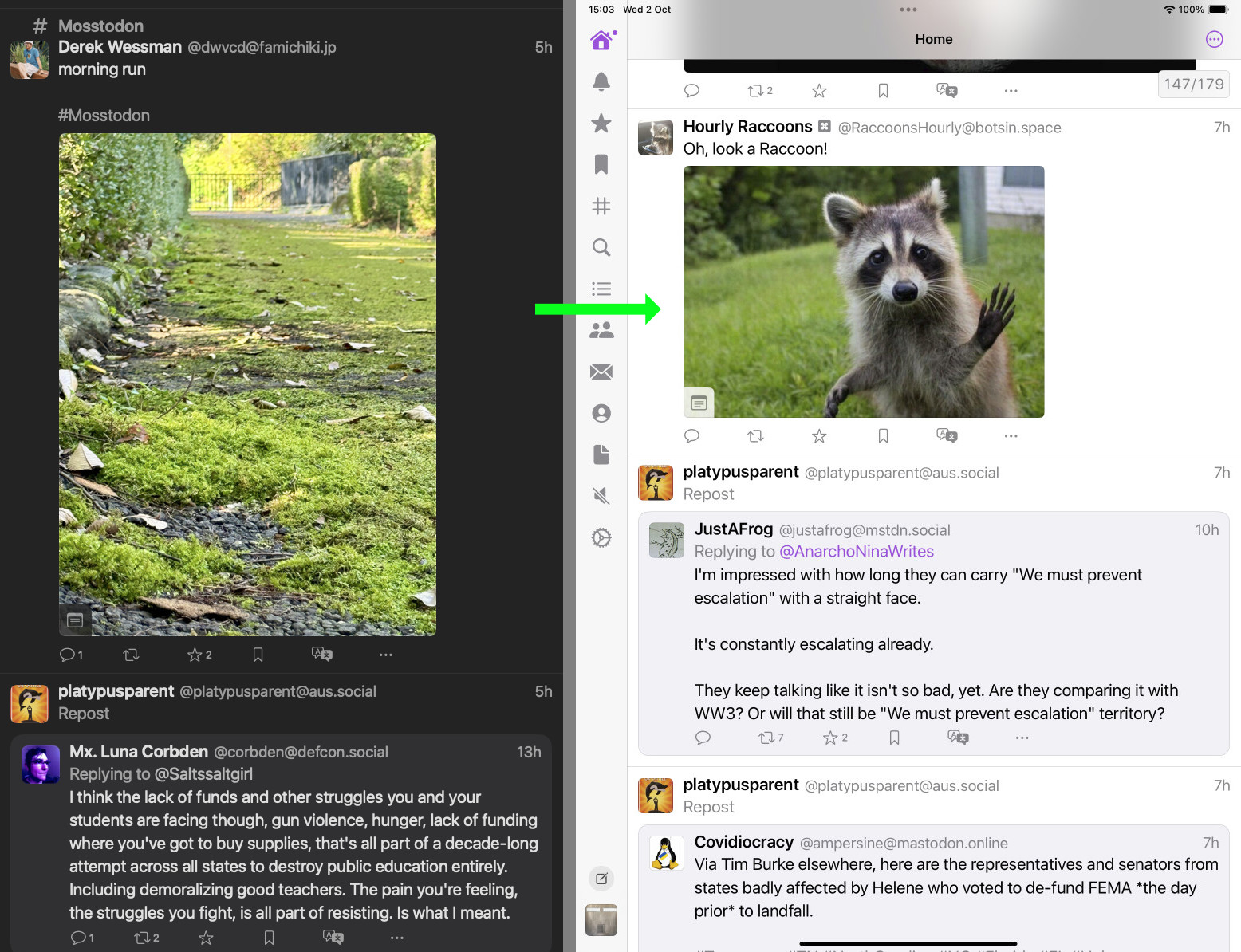
What these images are showing is that I was reading my Mastodon feed in Mona for Mac, and I had reached a point where I was 5 hours in the past, in terms of the posts I was reading. I moved over to my iPad, unlocked its screen, opened Mona for iPad, and after it did it’s “restoring iCloud Position” dance, it synced to a point that was 7 hours in the past.
Later in the evening, I tried again, this time going from my Mac to my iPhone:

This time I went from 1 hour in the past, to 6 hours in the past upon unlocking my iPhone, opening Mona, and waiting for it to “restore iCloud position”.
Or another attempt:

…you get the idea.
To be clear, what is happening here is that Mona is saying it’s syncing my reading position on my iOS devices, to match where my Mac is at, and getting it wildly wrong.
What’s really problematic about this is that there’s no way to get the correct timeline position from my Mac, with the iOS device. If I look in the settings on the iOS devices, I will see that the last upload of Mona sync data to iCloud from my Mac was after I stopped advancing the timeline, and yet, for no good reason I can figure, Mona is picking some random (and inconsistent) time as it’s sync timecode.
Where this becomes a data-loss class issue, is that any interaction with Mona on the iOS device at this point overwrites my Mac’s timeline location. If I do any scrolling on the iOS device, it will push that timeline to iCloud, and my Mac will then jump to that location, if it is still awake with Mona on the screen.
I lose the correct data, by interacting with the incorrect data in any way.
If I swipe quit Mona on the iOS devices, and relaunch it at this point, it will load with its timeline set to the current moment, and then overwrite my Mac’s timeline location.
The only way to get consistent timeline sync is to have both devices open in Mona next to each other, and then advance the timeline on the source device, until the destination device reflects those changes. At this point the timelines will do the party trick of moving their timelines in unison.
Obviously, this isn’t a tenable situation – the whole point of iCloud Sync is that you can do something on one device, switch to another device any amount of time later, even if the original device is asleep or shut down, and just pick up where you left off. As far as I can recall, Mona is the only application I use which makes use of iCloud Sync, and consistently fails to correctly sync.
Whatever the reason, the point is that the Sync function doesn’t work in the real world. As a gimmick, making the timeline on one device move in realtime sync with another device is fine, but that doesn’t solve the problem of maintaining continuity of reading location as you switch between devices.
The other thing that bugs me about Mona, is the timeline compression that occurs after not using the application overnight. You sit down to Mona in the morning, to catch up on what’s happened in your feed overnight, and some inconsistent way on from your current location, is a Load More Posts label; after which, your feed continues from only 4 hours ago.
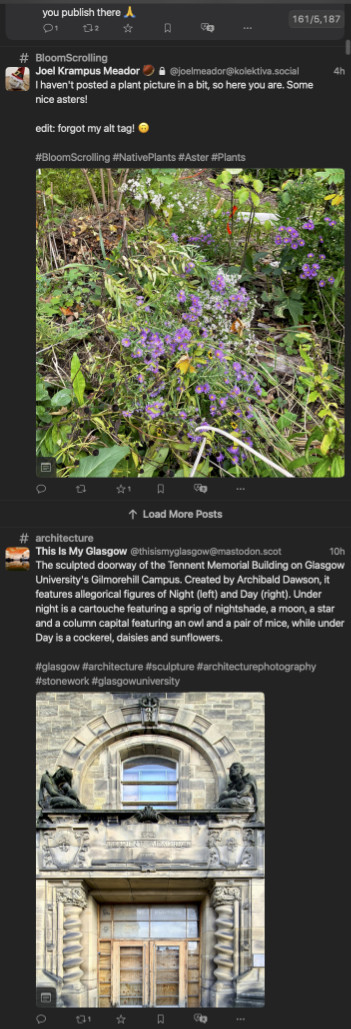
What inevitably happens as I sit there scrolling un-caffeinated, is I find myself suddenly wondering why I’m already at only 2 hours, and realise somewhere in my scrollback is a clickable link to load between 6 and 8 hours worth of posts. So I have to manually scroll back, until I find an image I recognise from last night, and then carefully find the single line Load More Posts link.
This wasn’t the behaviour of the app when I purchased it. For whatever reason, no matter how many times I’ve made this suggestion, the developer won’t do anything to either make this a behaviour that can be disabled, or make the Load More Posts label more obvious; like giving it a bright contrasting background colour, or a skeuomorphic broken, saw-toothed edge, which contrasts against the dominant horizontals and verticals.

It’s maddening, and a great example of how self-sabotaging people can be with their own work.
So that’s Mona (as of 24, October, 2024), an app that showed great promise in its early days for its massive, industry-leading customisability, which really pointed to a better direction for software which every part of the UI being user-modifiable, but which is now drowning under its basic technology not being up to the task, and its core feature – the literal reason you would use it, and not a browser; feed syncing, no longer actually working with any reliability.
It really does seem that no one is capable of making truly great software any more. Whether it’s building on janky non-native libraries, or image editor apps that are restricted to a single window with no tear-off palettes, or photo library apps that can’t have the thumbnails in one window, and the viewer in another, or full-screen preview software that can’t cope with having more than one display, everything seems to be collapsing to a world premised on no one using anything other than a single-screen laptop.
What has gone wrong with the culture of software development?
2024 – Week 42
For registered users.
2024 – Week 41
For registered users.
2024 – Week 40
For registered users.
2024 – Week 39
For registered users.
2024 – Week 38
For registered users.
Cutting the Apple Podcast Cable.
I’ve been listening to podcasts for over 20 years. The entire time, my collection has been subscribed, and managed within Apple’s iTunes.
No longer.
Podcasting is a medium under threat from a number of assailants:
- Advertising agencies and “Podcast Networks” using Dynamic Ad Insertion: Advertising has shifted to “zero effort” pre-recorded ads, that are geotagged and invasively targeted to the listener. It’s a worse version of commercial radio advertising.
I was listening to a recent episode of a show on the “i heart radio” network (fetch my vomit bucket), and it had (if I recall) eight 30 second pre-recorded ads in a single break.
Prior to this development, podcast advertising was almost exclusively sponsor reads by the hosts of the show – you could enjoy listening to them, because the hosts would bring their own charm to the commercial.
Now you’re listening to a (typically) American or British show, and you suddenly get a broad Australian (in my case) accent pitching you McDonalds, or coal-fired power. So now, I skip ads reflexively. - Independent Podcast Applications trying to do both too much, and too little: Every podcatcher & podcast player I’ve found so far, that run on Mac and iOS, are loaded up with recommendation garbage and show discovery, but won’t actually provide a competent interface or methodology for managing a locally-stored podcast collection*.
- They all seem to presume that either no one collects podcasts, treating them as ephemerally as radio, or that everyone burns down their entire back-catalogue collection every time they change application, and just re-downloads everything from scratch. Every app features OPML export to migrate the feeds between apps, but no one provides a mechanism to migrate the downloaded episode library.
- If you have files that aren’t attached to a feed, they’re effectively inaccessible, because none of the apps (from my experience) will let you just point to a directory full of files, and treat that as a show.
- There’s also the sheer idiocy of using cloud services to sync the actual episode files themselves, tens or hundreds of megabytes in size, rather than just direct transferring them between devices. I think there has to be something profoundly wrong with you, if you think the way to move data a foot across a desk, is to round-trip it via a server on the other side of the world.
- Apple: As the big dog in podcasting (though I note with significant schadenfreude that Spotify has apparently dethroned them), Apple is attempting to pivot from simply providing good applications, and a directory of shows, to selling subscription-based premium podcast feeds (and providing a mediocre podcast application).
To that end, Apple has stymied access to the location where Podcasts.app on the Mac downloads its files; using randomised strings for names of files and directories, therefore removing human readability. Worse still, it’s enforced location is on the boot drive – something that can’t be upgraded on almost all Macs, and for which Apple typically charges approximately four times the industry norm, per gigabyte**.
This comes after years of streaming-oriented changes to podcasts in iTunes, which made the process of keeping your files safe from auto-deletion more and more uncertain. It eventually required manually saving every single file, OR accepting a risk that if a feed moved and reposted its back catalogue to a new server, or changed the naming scheme for back catalogue files, iTunes would download the entire back catalogue again.
*Which excludes Overcast, because its entire basis is you rent space on Overcast’s servers, and store your collection there. However, I don’t build my archive plans on how long a single developer remains interested in continuing an app or business, nor on the volatility of server rental.
**I’ll note with some bitter irony that Mac OS X used to have human-readable plain text XML for all preference files, but they’ve been largely replaced with binary encoded versions that require a dedicated application to decode, and this regressive change was justified as saving disk space. Sure Apple, we’ll save a few megabytes so you can cheap out on the SSDs you put in machines, which you’ll fill to the brim with podcast files we used to keep on external drives.
So to hell with Apple.
Where to from here? Well, I’ve started by:
- Manually copying all my podcast back catalogue episodes out of my old iTunes Music directory, into a new Podcast Archive: Everything there is organised in human-readable simple directory structures, with a folder for each show, and every episode in the appropriate place.
To deal with shows which have changed server, or changed their “album artist” or “artist” ID3 tags (which is what determines the name of the show / feed within the Podcasts.app), I’ve used a tag editor (MP3tag) to align all the previous episodes to the show nomenclature of the newest episodes.
For mass file renaming, to match the name schema of new downloads (because iTunes used to do strange things to filenames when saving podcast downloads), I’ve used Name Mangler.
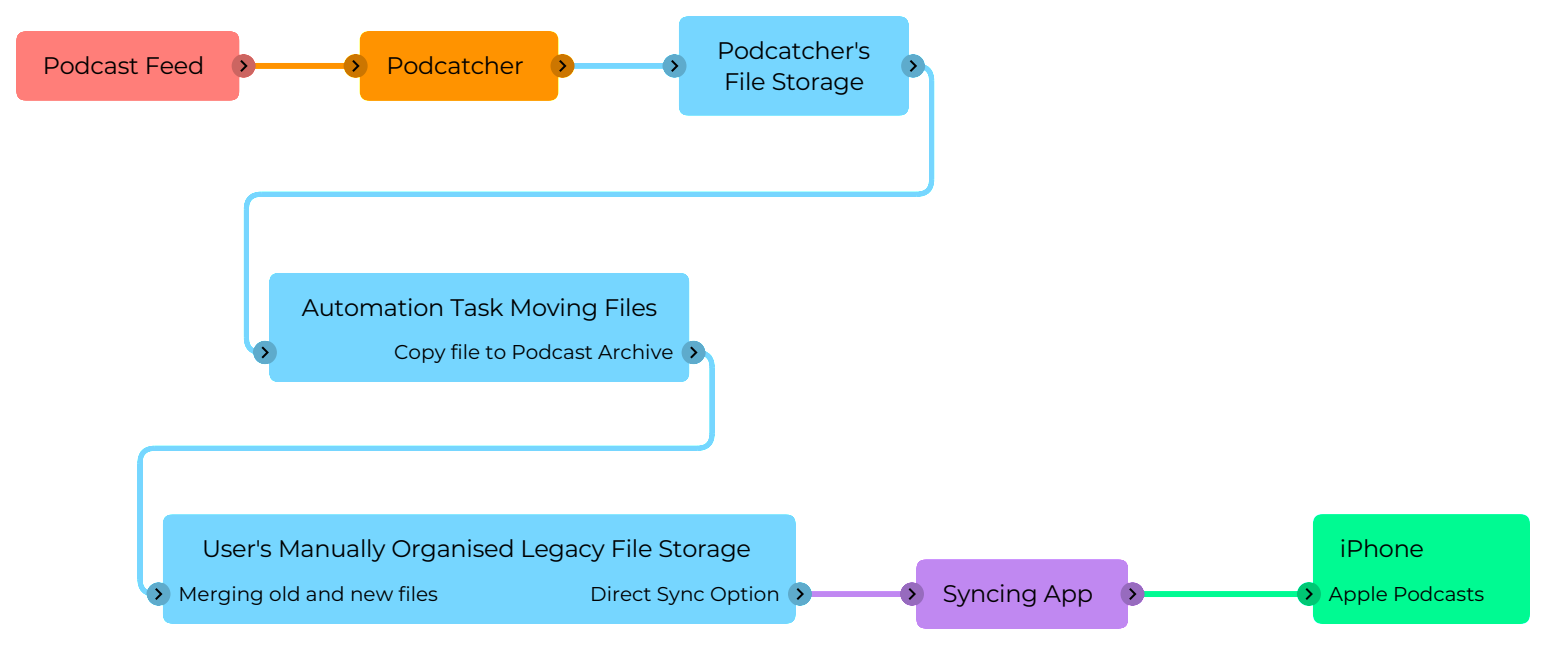
For cases where the date created and modified of files are out of order, I’ve used A Better Finder Attributes to adjust things so that Finder’s view of the episodes can, by sorting as a list, reflect their original feed order. - Setting up a new podcatcher application: Doughnut – an open source podcatcher and player. It’s still relatively early in development, and seems to have become somewhat dormant, but it’s a workable, basic application that has no frivolous show discovery or non-core functionality. I’ve set up all my subscriptions in Doughnut that were previously active in iTunes. Doughnut downloads new episodes automatically to disk, but that doesn’t solve keeping them in my new Podcast Archive, since it can’t display existing files on disk – it only knows about things it has downloaded.
- Transferring downloads to the Podcast Archive: Once Doughnut downloads a file, Hazel (a system automation tool) copies the file to the corresponding directory in the Podcast Archive.
The setup for this is pretty simple. In Hazel, I configure every folder Doughnut created for each subscribed show as an automated folder. I add an automation to each that has the rules; “File was created in the last 5 minutes”, and “move to (the Podcast Archive folder for that show)”. You could achieve this with the system’s built-in Folder Actions, or Shortcuts, etc.
The nifty thing about this is that since both the Doughnut directory structure, and the Podcast Archive are on the same logical APFS volume, the copy doesn’t use any more space – the two files are just references to the same thing, but behave as if they’re independent objects. Another advantage of this is if Doughnut has an issue, like randomly deleting files, it’s only acting on its downloaded copies, not your actual Podcast Archive. This of it as air-gapping your collection from the podcatcher. - Viewing the Podcast Archive: While I can just browse my files in Finder, in any of the traditional views, what if I wanted a more holistic overview of all my shows in the archive, in a single list, ordered by date? Remember Spotlight Finder searching, and Smart Folders / Saved Searches? A bunch of wonderful technologies that have sat, undercooked without full GUI support sine Apple bought Siri and realigned the company around the idiotic notion that a server on the other side of the world was the best way to search for things on your computer. What we do, is:
- navigate to the root directory of the Podcast Archive
- in the search field at the top of the Finder window, type a single space character. This non-discoverable and unintuitive action will bring up the GUI options for crafting your search criteria.
- hit the plus sign
- set up Kind, as Document, and then hit plus again
- set Date Modified as however far back you want the list to show, if you want to limit the list; the last month, for example.
- Save your search (I keep saved searches specific to a volume on the root level of that volume) and choose to add it to the Finder sidebar, because that makes it available for use in open / save dialogue boxes (normally, Smart Folders can’t be accessed through an open / save file browser).
- Syncing to iPhone: Here we come to iMazing, which has the ability to copy files from Finder, directly into the Podcasts.app on your iOS device, without having to go the whole Finder sync procedure.
A word of caution; one of the goals of this process was to completely cut Apple out of my podcast life. When you install / first launch Apple’s Podcasts.app on iOS, it defaults to iCloud enabled, and downloads all your podcast subscription records from your iCloud account in the background before you interact with it. It is VERY hard to get rid of this once it’s in the app, so an important step within iTunes (or the Podcasts.app on Mac) is to:- Manually unsubscribe from every show to which you’re subscribed (and give that a few minutes to propagate to iCloud).
- Switch off iCloud podcast sync on your Mac.
- THEN delete Podcasts.app from your iPhone, nuking all its data with it.
- Reinstall Podcasts.app on your iPhone, it should then load with an empty library because iCloud has no data for it.
- Disable iCloud Sync in the settings app for Podcasts.
- Now you’re ready to copy files with iMazing. One thing – you may encounter a bug where Podcast artwork isn’t copied across. As of mid-September, iMazing is aware of it, and are working on a fix.
And there you have it – you are now effectively back to the way things were when Podcasts were subscribed to in iTunes, and synced to an iPod. You lose a couple of things, like play counts, and synced playhead positions. However, iMazing’s drag & drop podcast loading (for which you can use your super-handy Smart Folders as your source) is a better workflow than the original iTunes sync. You also gain the ability to edit your podcast files (so those 10 year old adds for Lootcrate…) without worrying about breaking feed continuity.