
Third Attempt:
The Code:
Second attempt, and here is the HTML plus CSS an actual page.
Where things are at so far – there’s no overt accessibility info in the HTML, but at this stage, the only way to make Apple Books vocalise the content, is for the image to be a background texture for the body tag, and for the text to be visible – using display none of visibility hidden means Apple Books won’t vocalise it. The workaround here is setting its colour to zero opacity in RGBA – using an opacity setting directly also removes it from vocalisation.
Apple Books will only vocalise the first page of a spread – so if there’s text on the left page, it won’t read the right.
I have to assume there’s a better solution than this.
Some thoughts are:
- I could put the entire book’s narration on the cover page, so it can read the entire book all the way through without any interaction. The player overlay does remain persistent across pages, so a person who is partially sighted could read along.
- What’s the fallback if they lose sync?
- Interacting with the table of contents seems to interrupt the playback, and dismiss the audio player.
- What’s the fallback if they lose sync?
<?xml version="1.0" encoding="utf-8"?>
<html xmlns="http://www.w3.org/1999/xhtml" xmlns:epub="http://www.idpf.org/2007/ops" xmlns:ibooks="http://vocabulary.itunes.apple.com/rdf/ibooks/vocabulary-extensions-1.0" epub:prefix="ibooks: http://vocabulary.itunes.apple.com/rdf/ibooks/vocabulary-extensions-1.0">
    <head>
        <title>The Metaning</title>
        <meta name="viewport" content="width=710, height=1004" />
        <meta charset="UTF-8" />
        <link href="css/styles.css" type="text/css" rel="stylesheet" />
        <style>
            body {
                background-image: url(images/page-05.jpg);
            }
        </style>
    </head>
    <body>
        <!--<img src="images/page-05.jpg" alt="" />-->
        <div id="caption">
            <h1>Page One</h1>
            <h2>Panel One</h2>
            <p>In an empty and dark void, a tiny speck of light pops into being. Its edges indistinct, and vibrating with energy. it casts a brittle glow, the colour and texture of rusting steel.</p>
            <p>The Artist Narrates, It Begins.</p>
            <h2>Panel Two</h2>
            <p>Zooming in to the mote of energy, it is revealed to be a single atom, Hydrogen, a consumingly bright sphere of energy, with a miniscule companion sphere, an electron orbiting around it.</p>
            <p>The Artist continues, It begins as these stories often do.</p>
            <h2>Panel Three</h2>
            <p>The frame is filled by a close view of The Artist's face. His narrow, wide glasses lenses, fill the frame.</p>
            <p>He is bathed in light, thick strands of hair hanging across his face, casting shadows.</p>
            <p>His glasses are reflecting a light so bright, his eyes cannot be seen.</p>
        </div>
    </body>
 </html>
html, body {
 width: 710px;
 height: 1004px;
 margin: 0;
 padding:0;
 font-family: helvetica;
}

img {
   width: 710px;
   height: 1004px;
   position: absolute;
   padding: 0;
   margin: 0;
   top: 0;
   left: 0;
}

body {
 background-size: contain;
 background-position: center center;
 top: 0;
 left: 0;
}


#caption {
   z-index: 1; /* ensure caption is in front */
   color: rgba(255, 255, 255, 0);
}
The Code:
<?xml version="1.0" encoding="utf-8"?>
<html xmlns="http://www.w3.org/1999/xhtml" xmlns:epub="http://www.idpf.org/2007/ops" xmlns:ibooks="http://vocabulary.itunes.apple.com/rdf/ibooks/vocabulary-extensions-1.0" epub:prefix="ibooks: http://vocabulary.itunes.apple.com/rdf/ibooks/vocabulary-extensions-1.0">

   <head>
      <title>The Metaning</title>
      <meta name="viewport" content="width=710, height=1004" />
      <meta charset="UTF-8" />
      <link href="css/styles.css" type="text/css" rel="stylesheet" />
   </head>

   <body>
      <img src="images/page-13.jpg" alt="Page 11" />
   </body>
</html>
The CSS:
html, body {
   width: 710px;
   height: 1004px;
   margin: 0;
   padding:0;
   font-family: helvetica;
}

img {
   z-index: 0;
   width: 710px;
   height: 1004px;
   position: absolute;
   padding: 0;
   margin: 0;
   top: 0;
   left: 0;
}
The Artwork:
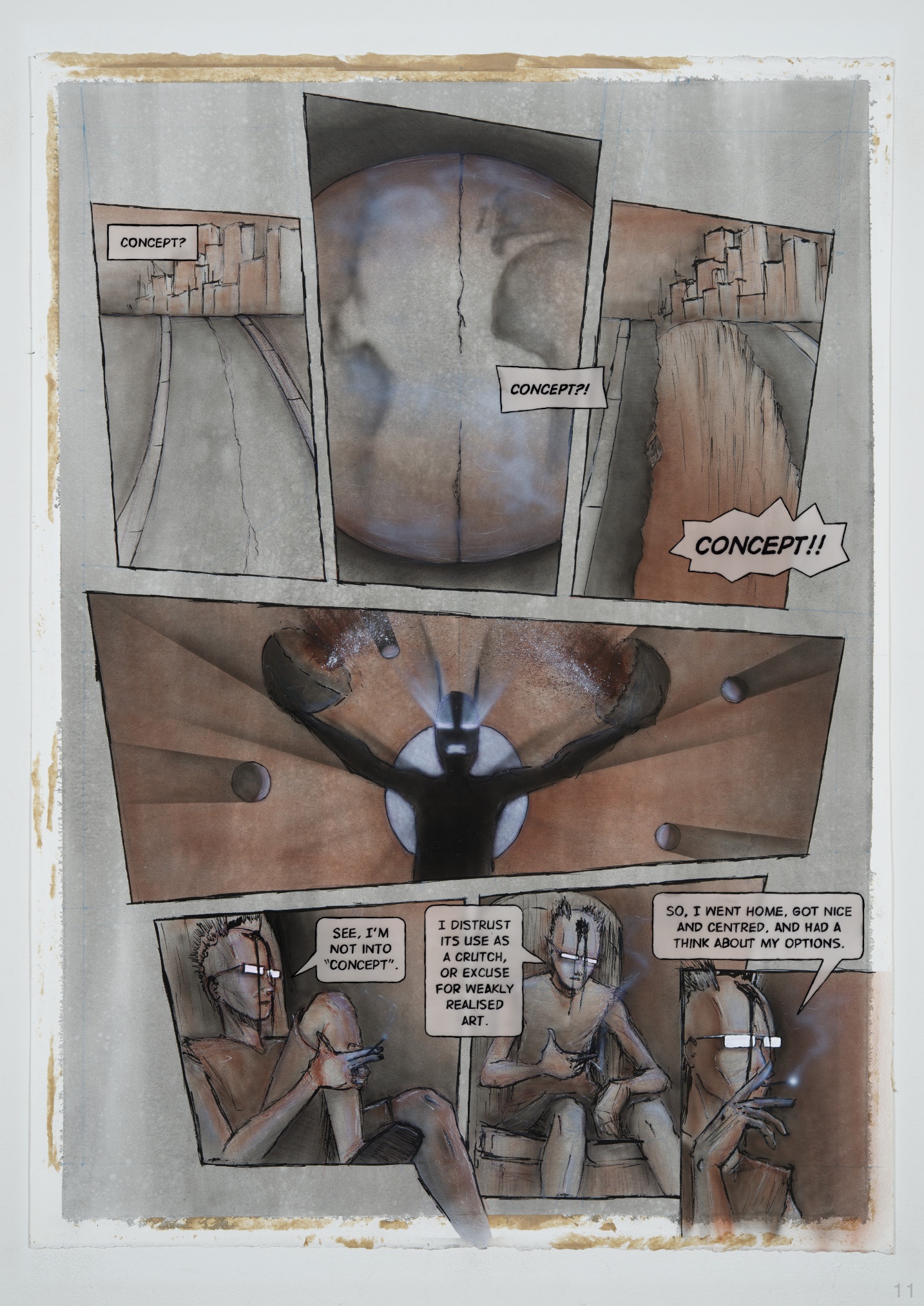
Text attempt for Panel 6:
Now the artist is facing most of the way towards us, his legs back inside the panel with him. He is sitting on a simple weathered throne of ancient stone, leaning forward. His left hand is hanging relaxed, the wrist against his knobbly left knee. His right hand is in a gesture, palm half up, thumb to the right, index and middle finger together outstretched. Between them is clamped the cigarette, which is trailing a thin stream of smoke, as the hand brings it towards his face. The Artist directs his attention to us, his eyes invisible behind the blank white, narrow rectangles, which form the lenses of his glasses. His head is bowed slightly forward, as if he is peering at us over the top of their frame. Or, perhaps he is looking down at our feet. He continues his manifesto, on Concept.
He says, “I distrust its use as a crutch, or excuse for weakly realised art.”
Following is an attempt at the code, with just frame six containing the full textual description.
<?xml version="1.0" encoding="utf-8"?>
<html xmlns="http://www.w3.org/1999/xhtml" xmlns:epub="http://www.idpf.org/2007/ops" xmlns:ibooks="http://vocabulary.itunes.apple.com/rdf/ibooks/vocabulary-extensions-1.0" epub:prefix="ibooks: http://vocabulary.itunes.apple.com/rdf/ibooks/vocabulary-extensions-1.0">
<head>
<title>The Metaning</title>
<meta name="viewport" content="width=710, height=1004" />
<meta charset="UTF-8" />
<link href="css/styles.css" type="text/css" rel="stylesheet" />
</head>
<body>
<img src="images/page-05.jpg" />
<!-- begin accessible captioning -->
<div id="caption">
<h1>Page One</h1>
<h2>Panel One</h2>
<p>content</p>
<h2>Panel Two</h2>
<p>content</p>
<h2>Panel Three</h2>
<p>content</p>
<h2>Panel Four</h2>
<p>content</p>
<h2>Panel Five</h2>
<p>content</p>
<h2>Panel Six</h2>
<p>Now the artist is facing most of the way towards us, his legs back inside the panel with him. He is sitting on a simple weathered throne of ancient stone, leaning forward. His left hand is hanging relaxed, the wrist against his knobbly left knee. His right hand is in a gesture, palm half up, thumb to the right, index and middle finger together outstretched. Between them is clamped the cigarette, which is trailing a thin stream of smoke, as the hand brings it towards his face. The Artist directs his attention to us, his eyes invisible behind the blank white, narrow rectangles, which form the lenses of his glasses. His head is bowed slightly forward, as if he is peering at us over the top of their frame. Or, perhaps he is looking down at our feet. He continues his manifesto, on <strong><em>Concept</em></strong>.</p>
<p>He says, "I distrust its use as a crutch, or excuse for weakly realised art."</p>
<h2>Panel Seven</h2>
<p>content</p>
</div>
<!-- end accessible captioning -->
</body>
</html>
CSS changes to handle the captioning, so that it doesn’t interact with the page image. I had a look at the “sr-only” class, and that appears to just be an arbitrary name used in the Bootstrap css pre-rolled style package. Do any screen readers treat it specifically differently, than they would if the same CSS values were assigned to a class of “bigbird-only”?
html, body {
   width: 710px;
   height: 1004px;
   margin: 0;
   padding:0;
   font-family: helvetica;
}

img, #caption { /* ensure caption text and image boxes are identical */
   width: 710px;
   height: 1004px;
   position: absolute;
   padding: 0;
   margin: 0;
   top: 0;
   left: 0;
}

img {
   z-index: 0; /* ensure image box is in front */
}

#caption {
   z-index: -1; /* ensure caption is behind */
   visibility: hidden; /* ensure caption is also invisible */
   overflow: hidden; /* prevent scrollbars or viewport nudging by text */
}