This week seems to have brought a conclusion to several weeks of frustrating glitches with my display setup on my Mac. For reference, this is my setup:
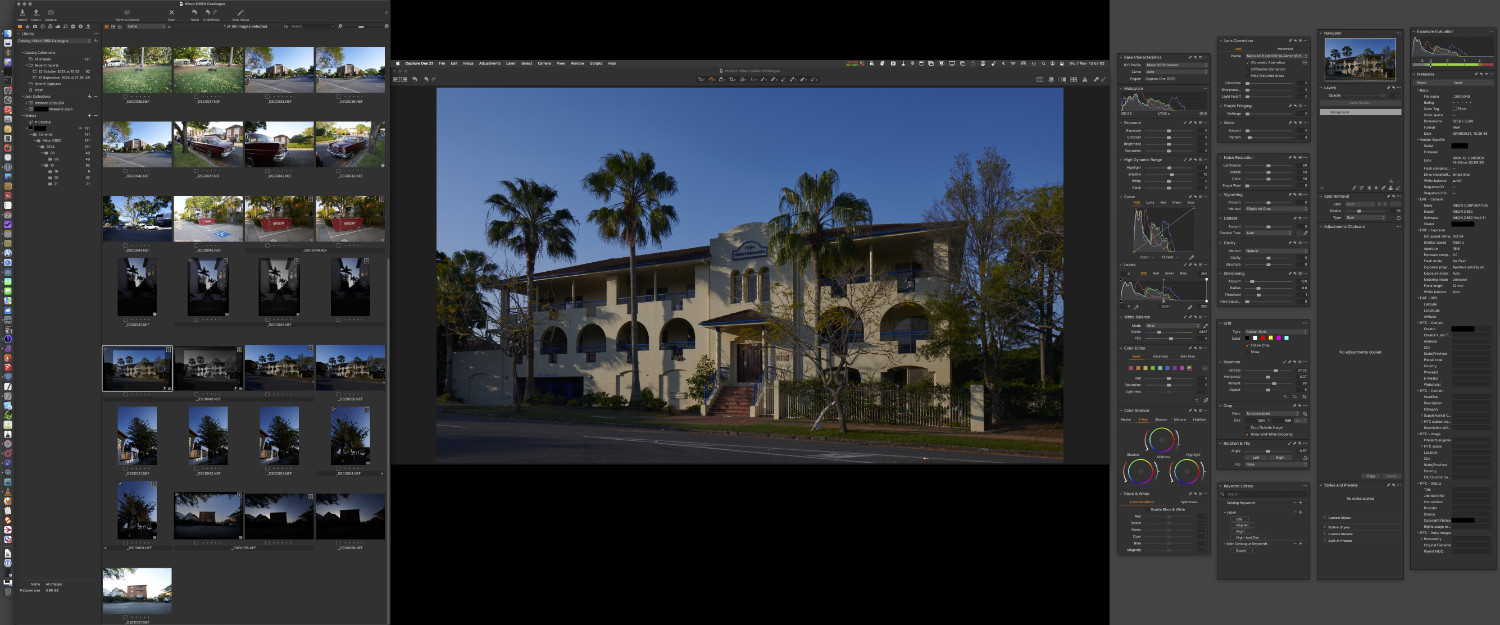
Three displays:
- a middle main landscape 16:9 27″ display,
- left, and right portrait 16:10 24″ displays.
I run a single space for all three displays, so a single menubar in the middle, and the ability to have windows span across screens (useful when working on large spreadsheets). There’s also a piece of software, SwitchResX which slightly over-drives the resolutions of the side displays, so they match the apparent pixel density of the main display.
The main purpose of this setup, is so I can splay all the palettes of my main work applications out over multiple screens, and get everything salient visible at once; all the properties of something are glanceable, and alterable, without having to navigate down into docked palettes, etc. If I need a menu and don’t want to travel back to the top of the middle screen, Many Tricks’ Menuwhere puts the menu as a floating palette under my mouse pointer.
The problem manifested as booting the computer to find my desktop wallpaper had reset to the operating system default, forcing me to reconfigure it… for three displays, and seven spaces for each set of displays. Twenty one separate image or colour choices to configure after each boot.
Thinking the problem may have been an issue with the system finding the directory of my user account on the PCI SSD I boot off, I tried moving the desktop pictures to a SATA SSD, which I knew to be mildly more stable within macOS (it’s seen as an internal disk, whereas a SSD blade on a PCI card is seen as external).
That didn’t really solve it, so I tried something drastic – deleting user and operating system caches. That was a disaster, and resulted in the system experiencing terrible instability; kernel panics every couple of days, in a system that had only had perhaps one a year.
I bit the bullet and reinstalled the operating system in place, keeping my user account and applications. This basically refreshes all the Apple-supplied software, clears caches etc. That sort of worked, in that it changed the nature of the problem.
Now the issue was that when the system would wake from sleep, it would have trouble opening communication with all the displays. These screens are on the end of 7m DisplayPort cables, plugged in to DisplayPort to Type-C adapters, connected to the Thunderbolt ports on my Mac Pro’s main GPU. Waking from sleep would see the login UI jump from screen to screen, as the main screen seemed to struggle to power up in response to a signal.
I knew the main screen worked on its own, because I’d reinstalled the operating system with just it connected. However, one symptom of wake was really odd; in the screen dancing, one of the screens was showing the OS default wallpaper, rather than the one which should have been shown. This hinted a problem was that there was a screen detach event happening, and part of the process was the system “seeing” a new screen configuration, and treating one screen as a new entity, unknown to it so far. After the screens stabilised, and I logged in, the telltale signs of screen detach events were evident – palettes from Affinity applications all messed up on the main screen, because Affinity lacks the ability to recover from screen configuration changes.
I’d eliminated software issues, disabling various tools that interact with displays, that left only hardware; my suspicious fell on the adapter dongles.
On Amazon, I found a UGreen Type-C to DisplayPort 2,1 adapter. A wonderful piece of gear, with a braided cable, and compact metal DisplayPort end. I bought one, put it on the main display, the problem went away. I bought two more, put them on the other displays, the problem stayed away.
This appears to have solved all the problems. It’s hard to fathom an adapter dongle failing, but maybe the old ones (from the same company who supplied the DisplayPort cables) were just an older, less capable technology.
Either way, it seems to be fixed now.