Matt Godden

human : artist

Bring content into view.

Author : Matt

macOS Ventura eMail issue.

There’s an issue I’ve encountered a couple of times lately, where the SMTP server for an account will report in Connection Doctor that it doesn’t need authentication (even though it does) and fail to send mail.

There appears to be no solution to this, as all the settings will be correct, the only option is to delete the account in mail.app, and recreate it from scratch. Deleting just the SMTP server profile does not appear to be sufficient to do the job.
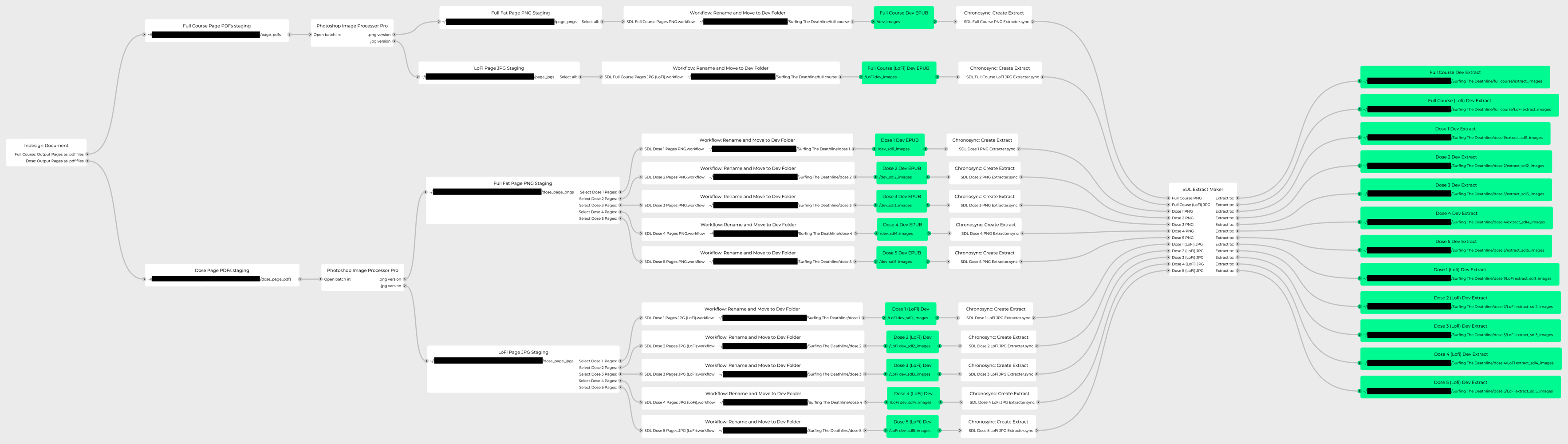


More Flowcharts

I realised recently that in the changeover to my new workstation, and the change to new operating system versions, my entire workflow for producing a Surfing The Deathline page art errata fix was broken.

Worse still, I couldn’t fit the entire thing in my head at once, so there was nothing for it, but to start mapping the whole thing out.

The process:

  • Adobe Indesign CS5.
    • Output all pages to individual .pdf files
    • Adobe Photoshop CS5.
      • Convert each page to .png, and .jpg files
      • Automator Workflow.
        • Rename files and copy them to the appropriate development folders
        • Chronosync Workflow.
          • Copy a subset of files to be used in the extract versions to the appropriate extract development folders.

A thought that occurs is to put the entire process into the Virtual Machine I’m using to run the Adobe apps, so that they’re sealed off against change.